

Web Replay and Heatmap Privacy
Sprig prioritizes user privacy by employing on-device masking for Replay and Heatmap capture. This ensures that sensitive information is redacted locally on the user’s device before any information is transmitted to Sprig.Web Replays
Sprig’s session Replay clips are not actual screen recordings. They are a reconstruction of changes in a web browser’s Document Object Model (DOM), which is the data representation of a webpage. The record of changes to the DOM are constructed into a video that represents a user’s interactions with a particular page. This approach enables Sprig to selectively capture data, such as user interactions and form content, while redacting other types of data, such as images and password fields.Heatmaps
Heatmaps are generated in a similar way to Replays. When viewing a Heatmap within Sprig, the underlying snapshot of the page is rendered using masked data. You will see where users clicked within the UI, but you will not see their personal information. Heatmaps focus on aggregate behavior (where and how many times users click, for example) rather than individual sessions and masking ensures that the backdrop behind the Heatmap remains compliant with the chosen privacy settings.Masking Settings
The following describes the available masking settings. For how to establish masking settings for your account, see Replay Creation or Heatmap Creation.- Field masking obscures input fields with a placeholder.
- Text masking obscures characters with asterisks.
- Image masking obscures images with a placeholder.
- Class masking obscures specified elements specified by ids and classes. Unmasking classes is not supported for web.
- Interaction masking does not capture keystrokes, clicks, touches, or console logs.
Latest
The minimum Web SDK version required to support the following privacy masking settings is Web SDK v2.22.0 or later:Basic
- Obscures all password and sensitive input fields.
Moderate
Everything in Basic privacy setting and…- Obscures all picker, text, and number input fields.
- Obscures canvases and maps.
Strict
Everything in Basic and Moderate privacy setting and…- Obscures all images and videos.
- Obscures text with asterisks.
- Does not capture interactions such as keystrokes, clicks, touches, or console logs.
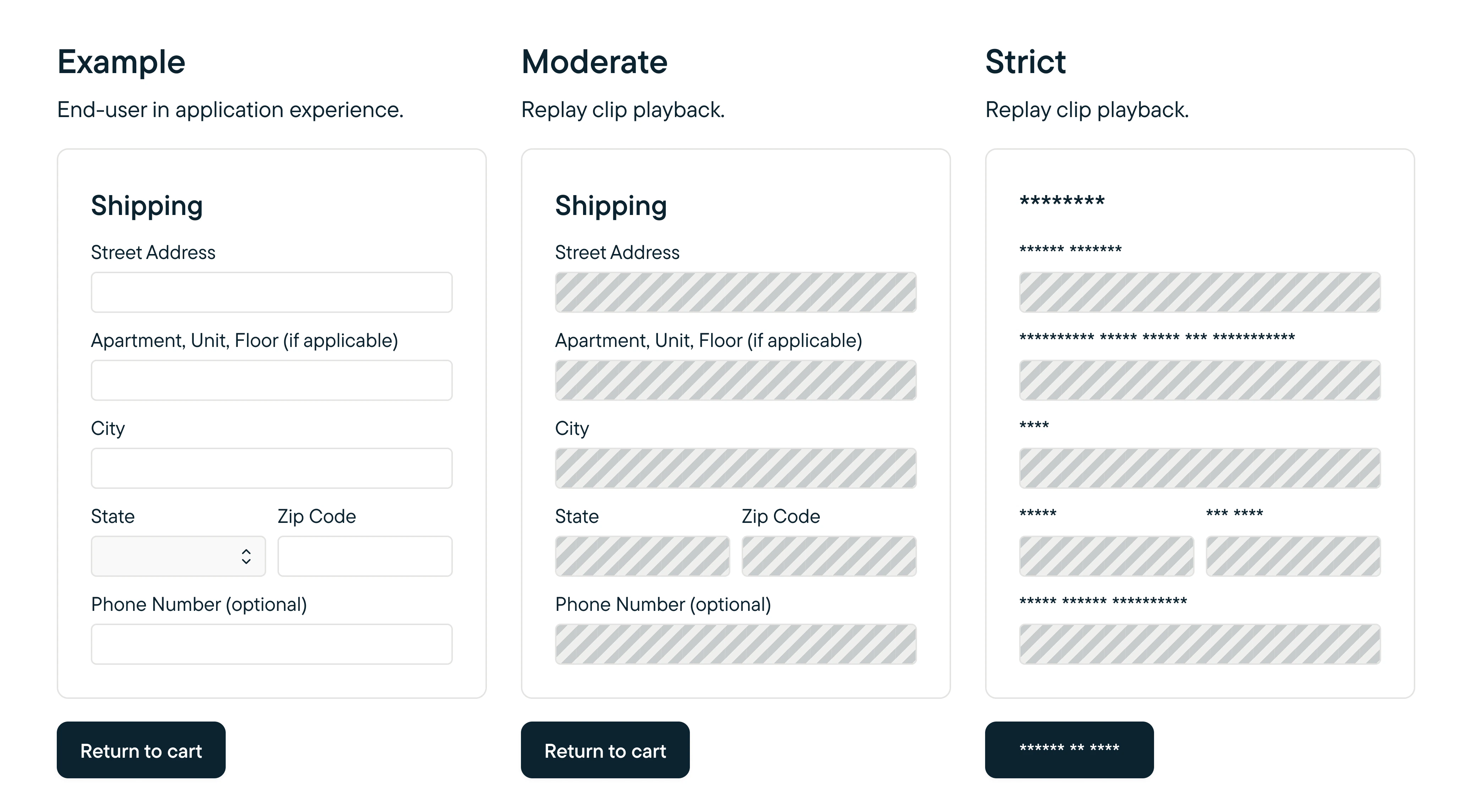
Mock up of privacy mode masking: Moderate masks only fields. Strict masks both text and fields.
Legacy
For Web SDK v2.22.0 and earlier… The following masking behavior is supported:- Password field masking.
- Form field masking.
- Image masking.
- Class masking.
- Interactions masking.
- Class unmasking.